Guide
Home Screen widgets for couples on iPhone
Nearlet gives a couple eight iPhone widgets. Three keep you close during the day: Photos for us, Signals and Your status. The others put your routines, tasks, lists, memories and time together on the Home Screen.
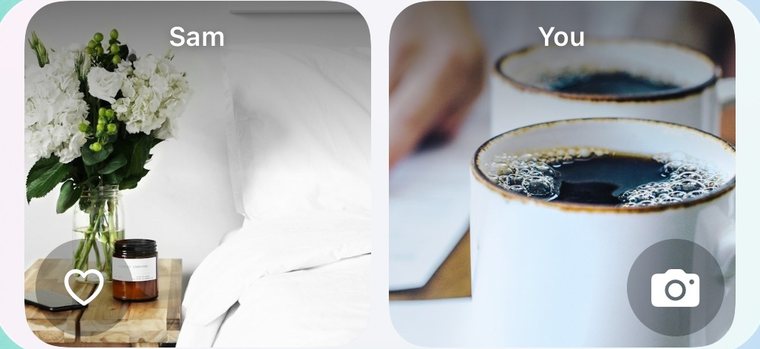
The eight widgets
| Widget | What it shows | What a tap does |
|---|---|---|
| Photos for us | Your partner’s latest photo on the left, yours on the right. | Tap yours to open the camera and send a new one. |
| Signals | Your latest exchange, such as “Thinking of you”. | Tap an icon to send that signal. |
| Your status | Two emojis: their mood and yours. | Opens the status editor. |
| Routines | Today’s routines, for one or both of you. | Tap a circle to tick a routine off. |
| Tasks and plans | Your next tasks and plans. | Opens the item, or adds a task or a plan. |
| Our time together | Years, months and days together. | Set or edit your date. |
| Memories timeline | Your recent memories. | Opens Memories. |
| Collections | One of your lists. | Opens that list. |
How to add one
- Touch and hold an empty area of your Home Screen.
- Tap Edit, then Add Widget.
- Find Nearlet and choose a widget.
- To change what a widget shows, touch and hold it and choose Edit Widget.
There is a longer walkthrough in How to add the Nearlet widgets.
Good to know
- Your partner’s photos stay off your Home Screen until you turn them on: in Nearlet, open Settings, then Widgets, and switch on “Show partner photos on Home Screen”. Anyone who sees your Home Screen can see those photos.
- Status notes are never shown on widgets, only the emojis.
- Widgets show the last data the app saved. iOS decides when they refresh. Opening Nearlet refreshes them.
- Routines comes in medium and large sizes. Collections and Memories timeline come in small, medium and large.
- The widgets are for iPhone with iOS 17 or later.
Questions
Do the widgets work without a partner?
The routines, tasks, lists, memories and time widgets work for your own space. Photos for us, Signals and Your status show two people, so they need a connected partner.
Can I use the widgets on the Lock Screen?
No. They are Home Screen widgets.
Are the widgets free?
Yes. All eight widgets are in the free version.